I recently posted a quick update about what I’d been experimenting with recently — one of which included agent frameworks that could act as an extension of how I work, with “on-demand” agents, recurring task pipelines and persistent memory.
My path here was the classic rabbit hole. I started in Claude Web for the core use cases, moved to Claude Desktop as I wanted more integrations and automated workflows, then to Claude Code once I wanted to build my own tooling, skills, and integrations. Eventually I wanted an agent harness running — something that could fire off automated skills and workflows on a schedule, or that I could trigger async from my phone.
This post is a deeper version of what I eventually set up: a personal AI agent harness — what people variously call a Personal OS, second brain, or chief of staff — running on a VPS, connected to my Discord server, reading and writing to my Obsidian vault. I’ll cover how I picked the framework, how the setup actually went, the billing situation that surprised me, the rabbit holes that cost me real time, and where things stand now.
This is not intended as a recommendation or a tutorial - It’s just my learnings from a live experiment in a landscape where the tools are still early and can look vastly different within 6 months.
The mental model
A personal agent harness is really three components:
- A messaging bridge — a small process that watches your messaging app (Telegram, Discord, etc.) and wakes up when you send something. This is the part that’s genuinely always on.
- Persistent memory — the agent needs to know your context across sessions. Without this, every message is a cold start.
- A proactive layer (optional) — the ability for the agent to self-initiate, not just respond: cron jobs, heartbeats, scheduled check-ins. Not every harness has this.
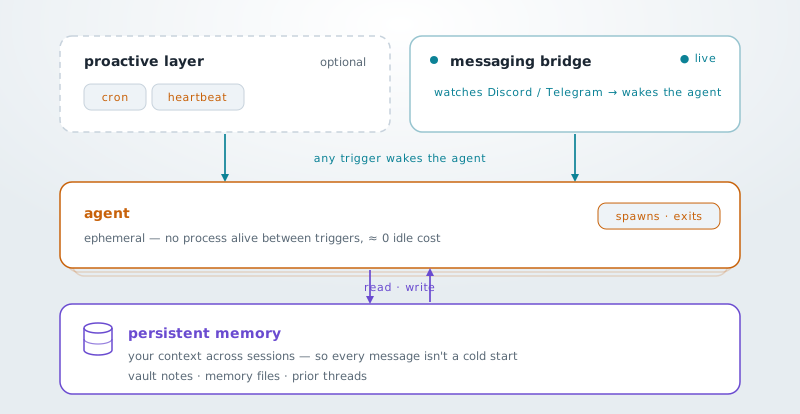
The thing that changed my view on cost: between messages, there is no agent process alive. No model quietly burning tokens while you sleep. The agent spawns when a trigger arrives (inbound message, heartbeat pulse, cron), does the work, and exits. The bridge is always on — the agent is ephemeral. Near-zero idle cost is the default, not an optimization you have to engineer.
This is also why proactivity changes the calculus. The moment you add heartbeats and scheduled triggers, you’re no longer only-on-demand — you’re paying to wake the agent on a schedule whether or not you needed it.
Three harnesses, a spectrum
Once I understood the architecture, I looked at the actual options. Early on I’d started building my own messaging bridge — then realized I was rebuilding what existing harnesses had already solved, so I dug into them instead. While the landscape is changing quickly and there are many options, three kept coming up: NanoClaw, OpenClaw, and Hermes. They sit at very different points on a heaviness spectrum.
NanoClaw is the lightest. It is a “thin orchestrator” around Claude Code and it doesn’t own its own agent loop — it simply wraps Claude Code, bridges it to your messaging channels, and stays reactive. Every agent session runs in its own Docker container with real OS-level isolation: not permission checks or allowlists, actual separate processes. It has no dashboard out of the box, no config files — you configure it by talking to Claude Code inside the repo. Small footprint, auditable.
There’s also a lineage worth knowing: NanoClaw was literally built as a philosophical reaction to OpenClaw. The README specifically names OpenClaw’s “everything in one Node process with shared memory” architecture as the thing it was trying to escape.
OpenClaw is the opposite end. A full personal-AI platform: owns its own agent loop, 20+ channels, web control UI. The headline feature is first-class proactivity — built-in cron, heartbeats, boot checks. That’s the chief-of-staff mode everyone mentions. The tradeoffs are real: larger application footprint (~500k lines of code, 53 config files, 70+ dependencies), app-level security (not OS-level isolation by default), and a standing idle cost because those heartbeats burn tokens even when you’re not asking anything. It also got banned by Anthropic in early 2026 for accessing credentials directly, then retreated to the sanctioned approach. Acquired by OpenAI this year.
Hermes sits in the middle. Self-contained, model-agnostic, has its own shell and CLI. Simpler to get up and running than either of the others. The practical catch: Hermes explicitly bills to API overage rates — it bypasses any subscription coverage. More on that in a moment.
I went with NanoClaw, for now, for specific reasons: OS-level isolation is real and auditable. Reactive means near-zero idle cost while I’m still figuring out what I’ll actually use this for. And Claude-native means it runs under a Max subscription rather than pay-per-token billing — though that may be more temporary than it sounds, which I will also get into below.
Setting up the droplet
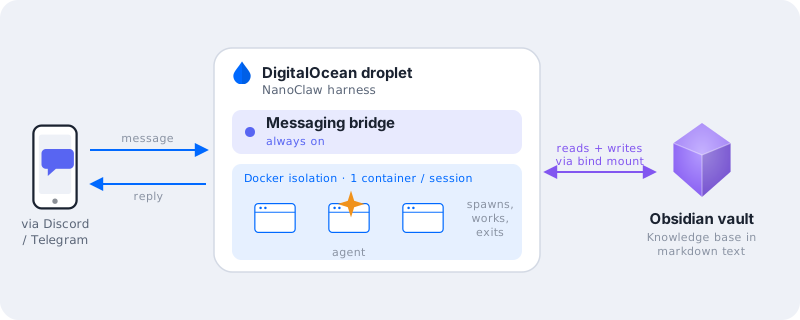
I started trying to run everything locally. Hit a RAM wall almost immediately — NanoClaw needs at least 4 GB free, and my machine didn’t have enough headroom. The call I made wasn’t “buy hardware to clear that floor” — this is still exploratory, and I didn’t want to commit to new hardware before I knew whether I’d stick with this going forward. I spun up a DigitalOcean droplet instead. I started with the $24/mo tier (with 4 GB RAM — the minimum NanoClaw recommended), though if you’re not doing heavy orchestration you could probably scale down to a cheaper instance (e.g. $4/mo for the 1 GB RAM tier). The advantage is flexibility: I can resize or shut it down without any sunk hardware cost. I do plan to test this sized down after my initial exploration, as I don’t quite yet see the value to be paying $24/mo to run.
Some people prefer a Mac Mini for 24/7 local access — no monthly running cost, simpler mental model, easier to maintain long-term. Both work. VPS made sense for me as a starting point while I’m still figuring out what I actually need.
I did some basic hardening: closed ports publicly via DigitalOcean’s firewall, and limited SSH access only through Tailscale. Non-root user owns the agent stack. Nothing exotic.
NanoClaw’s configuration model is more barebones. There are no config files, no settings panel. You configure it in two separate layers: for initial setup and channel management, you SSH in and run Claude Code inside the repo (/customize, /add-telegram, /manage-channels). For operational and runtime config, there’s a CLI called ncl — though in practice you rarely type it yourself: Claude Code in the repo runs the ncl commands for you, and the messaging agent can even self-adjust some of its own runtime config (personality, subagents) from chat. It took me a minute to understand that these were genuinely separate layers — not just two ways to do the same thing.
While configuring NanoClaw, I set it up with Claude as the model provider (while this was the only supported option initially, they’ve extended support for additional model providers recently), and I started with some basic integrations — my messaging bridges with Telegram and Discord, my Obsidian vault for the knowledge base, and my Github repos. There is further I could branch out here (e.g. with G-Suite integrations for calendar, email, and Drive), but I did not want to rush additional integrations that gave these agents broad access to my personal resources early on.
Setting up the Obsidian vault
I’ve been on Evernote for years, but I wanted something that worked better with agent tooling. Markdown files are easy for an agent to read and write. Evernote’s proprietary format is not.
The Obsidian setup has a few pieces worth knowing about:
Sync and encryption: Obsidian Sync handles the cloud sync, and the vault is end-to-end encrypted. Even if someone got hold of the sync token, they couldn’t pull the vault without the encryption password — that’s a reasonable posture for the sync path. The catch: the files sit plaintext on the droplet, because the agent has to read them. E2EE protects the transit and Obsidian’s end, not the box itself. That’s why scoping the vault narrowly matters — Obsidian supports multiple vaults, so the vault I mounted on the droplet is specifically scoped to what I want the agent to see. Sensitive notes never touch it.
Headless sync on the VPS: Obsidian’s official headless CLI (obsidian-headless) pulls the vault to the VPS; I run it as a systemd service and the agent gets the folder as a bind-mount. Straightforward to set up once you know it exists.
After trying this — I am exploring fully migrating from Evernote. I’m betting Obsidian scales better as I integrate it into more agent workflows (the markdown-native format is genuinely easier to work with), and I can scope vaults based on what I want to give agents access to. But I cant justify paying for both, and the Evernote price increases may not be worth it for my use case anymore.
The billing situation (read this before you build anything)
Fair warning upfront: billing for agent usage is genuinely complex right now, moves fast, and parts of what I write here may already be dated by the time you read it. I’ll be specific about what I know and what’s uncertain.
The surprise came when I was trying Hermes. I wired it to Claude via my subscription OAuth token and got an HTTP 400. The message, paraphrased: third-party app usage draws from “extra usage,” not your plan’s included credits.
The reframe that clarified things: Anthropic distinguishes between first-party usage (you using Claude.ai directly, Claude Code) — which is covered by your subscription — and third-party agent usage — which is metered pay-per-token regardless of your subscription tier. “I already pay for Claude” doesn’t mean your agent is free. The variable that matters is the auth path, not the tool’s reputation.
What makes this murkier: Anthropic announced in May 2026 that they’d move Agent SDK and third-party app usage off subscription pools onto separate metered credits, effective June 15 — then paused it on the day it was due to take effect. The New Stack and DevOps.com have coverage if you want to dig in.
Where each tool sits right now: Hermes explicitly bills to API overage rates — they’re transparent about it, and they know the subscription path isn’t sustainable long-term. NanoClaw and OpenClaw are currently riding the paused policy because they wrap Claude Code, which is first-party. But nobody knows how long Anthropic maintains this — OpenClaw already got burned once for a different policy violation.
Some people I follow switched to Hermes or similar tools paired with OpenAI Codex. Codex is bundled into the $20 ChatGPT plan, and several people find its agent-billing story works better for them — though it’s also gotten more metered in 2026, so I’d treat it as “different” rather than obviously simpler. Worth knowing about as an option. I stayed on NanoClaw because I wanted to keep using my Claude Max subscription — but I treat the billing advantage as temporary, not durable. If Anthropic re-enforces the policy broadly, or if Codex makes more economic sense at some point, I’d consider switching.
The rabbit holes that cost me time
Most of my actual hours didn’t go into clever assistant behavior.
Local hardware → VPS
Already covered above. Tried the reversible option first.
Harness journey — DIY → Hermes → billing surprise → NanoClaw
I started with a vague plan to build my own messaging bridge. Then discovered existing harnesses had already solved this. Tried Hermes first because the UX was simpler to get started. Hit the billing wall and switched to NanoClaw.
Hardening rabbit holes
I lost real time to security exploration — firewall rules, secrets management, credential paths. Some of it was genuinely useful. A lot of it was me chasing threads past my own knowledge ceiling with Claude’s help, which is a particular kind of trap. AI can help you reach further than you could on your own, but that same help makes it easy to follow a thread straight into the weeds without knowing whether it matters for your actual setup. Learning to ask “what can I safely skip for now?” was its own skill, and harder than the technical work.
Skills drift between machines
As I started using the system more across different workflows, I noticed skills and sub-agent configurations drifting between my local machine and the NanoClaw instance on the VPS. Adding a skill on one doesn’t automatically update the other — it’s very manual right now. I don’t have a clean solution yet. I probably need a git-based approach (or perhaps vibecode my own syncing tool?), but I haven’t gotten there yet.
Where I started to use it
It’s been running for some time now, where I set it up with some skills and agents for some use cases like these:
Daily planning workflow
Skills to update my Kanban board, set up daily and weekly planners. This is the most consistent use, the one that’s slowly starting to become a habit.
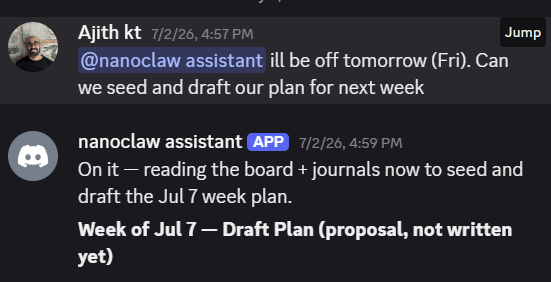
Content pipeline
Draft, review, publish workflow for this blog. The post you’re reading went through it: drafted by an agent, reviewed and validated by separate reviewer agents, published to a staging branch. The process is still a work in progress, but its been interesting to tinker with.
I can share more on these or other specific pipelines in future posts. Right now I wanted to get the foundational setup documented before I go deeper on individual workflows.
Where things are now
The bridge is on, the agent is live, and I can text my assistant from my phone and have it actually do things. That still feels a little magical sometimes, if I’m honest. It was fun kicking off some of my pipelines while I was travelling.
With that said I want to be clear about what this exercise is: exploratory and deliberately disposable. Committing to this stack long-term would be premature, especially as the landscape is moving fast. While I am on NanoClaw now, I might consider switching harnesses if evolving billing policies make it more economically viable to use Hermes (which supports multiple model providers out of the box).
On the commercial side — we see more developments with NanoClaw’s parent launching nanoco.ai targeting enterprise use cases and Hermes/Nous Research with their own commercial offering at portal.nousresearch.com. The ecosystem is consolidating (e.g. OpenAI acquiring OpenClaw), but new entrants keep appearing. I have no idea what this looks like by end of year.
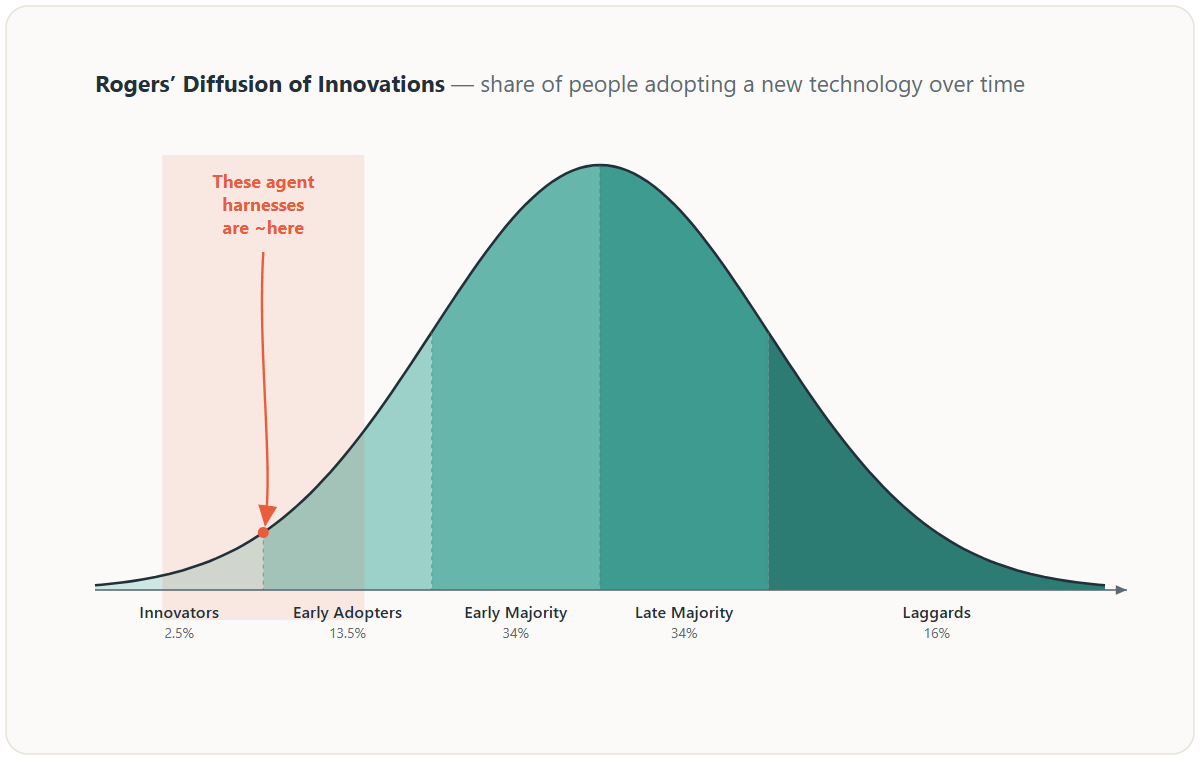
For those watching — I wouldn’t feel discouraged about falling behind, as these tools are clearly still early in their maturity. If you look at the Diffusion of Innovations curve, these tools would still fall in the innovators/early adopters territory, as they are still challenging for the majority to setup, the UX is evolving and still presents security risks that most might not be comfortable with yet.
That all said, if you want to experiment and learn like myself, do try them out. I’d love to hear how others are setting up your agent assistants (which harnesses, models, etc) and what workflows you are using them for.
As for what I’m planning to explore next: additional integrations (e.g. G-Suite, Granola, socials) to make this a more comprehensive chief of staff, and figuring out easier skill syncing between my local machine and the VPS instance. I will also have to be prepared to adjust the stack (e.g. droplet sizing, trying on a local machine, also trying different model providers) as pricing changes and I seek to optimize my spend. Lastly, if this moves beyond something exploratory, I’ll try adding more workflows beyond the two I shared above. I hope to share more on this soon!